
Quick Answer: A mechanical keyboard is usually the better gaming choice if you care about distinct key feedback, faster-feeling repeated inputs, customization, and long-term upgrade options. A membrane keyboard is the smarter pick when quiet operation, spill resistance, and a lower-cost complete setup matter more. For most competitive PC players, the Razer BlackWidow V4 X Check price is the stronger mechanical option. For quiet shared rooms and value-focused setups, the SteelSeries Apex 3 TKL Check price is the better membrane-style alternative. The Logitech G213 Prodigy Check price is a practical middle ground for players who want a full-size layout, quieter keys, and dedicated media controls.
Your keyboard is only one part of a responsive gaming setup. Mouse choice, mousepad space, network stability, and desk ergonomics matter too. Pair this decision with our guides to the best gaming desk with cable management, wired vs wireless gaming mouse latency, and the best WiFi router for gaming with low ping.
Table of Contents
- Why You Can Trust This Guide
- Mechanical vs Membrane Keyboard for Gaming: The Real Difference
- Best Overall Mechanical Pick: Razer BlackWidow V4 X
- Best Budget Quiet Pick: SteelSeries Apex 3 TKL
- Best Full-Size Value Pick: Logitech G213 Prodigy
- Comparison Table
- Which Is Better for Different Gaming Setups?
- FAQ
- Final Verdict
- Sources Reviewed
Why You Can Trust This Guide
We compared mechanical and membrane keyboards around the decisions that affect a real desk: key feel during long sessions, noise in shared rooms, cleaning after a spill, desk space, media controls, and whether the keyboard still makes sense when gaming ends and work starts. Product details were checked against official Razer, SteelSeries, and Logitech G product pages. We did not assume that mechanical is automatically better for every player, because comfort, noise, layout, and budget can matter more than switch type.
Mechanical vs Membrane Keyboard for Gaming: The Real Difference
Mechanical keyboards use individual switches under their keys. That normally creates a clearer physical response and makes it easier to choose a feel: clicky, tactile, or linear. It can also make a keyboard easier to maintain or customize, depending on the model.
Membrane keyboards use a flexible membrane layer. They often feel softer and quieter, and they can be a very sensible choice for late-night gaming, family rooms, dorms, or office desks. The trade-off is that they usually feel less distinct when you are repeatedly pressing movement keys or trying to feel exactly when a key actuates.
Neither type automatically wins games. For casual games, strategy titles, controller-heavy games, and general PC use, a good membrane board can be completely satisfying. Mechanical makes the stronger case when you play competitive shooters, rhythm games, MOBAs, or any game where you enjoy a more defined key press.
Best Overall Mechanical Pick: Razer BlackWidow V4 X
Best Overall Razer BlackWidow V4 X
Use-Case Evaluation: Best for PC players building a dedicated gaming desk who want distinct mechanical feedback, dedicated macro keys, and controls that stay useful across games, streaming, and desktop work.
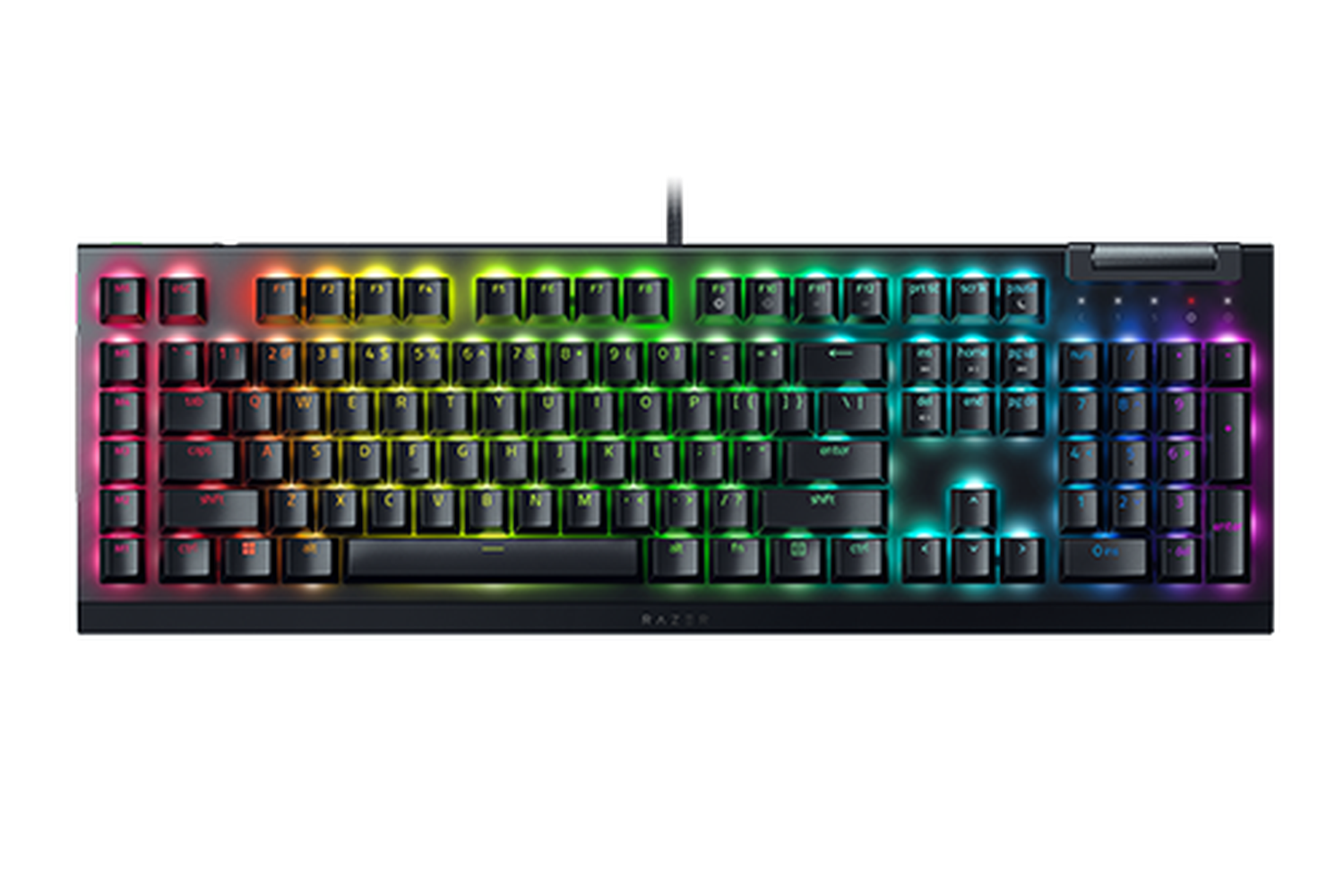
The Razer BlackWidow V4 X is the clearest choice here for players who already know they prefer a mechanical board. Razer offers Green clicky or Yellow linear mechanical switches, while the board adds six dedicated macro keys and separate media controls. That makes it especially useful for MMO shortcuts, streaming controls, productivity macros, or games where you frequently remap commands.
For competitive FPS, the main advantage is not a promise of automatic speed. It is the more defined key feel, which many players find easier to control during repeated strafes, quick weapon swaps, and long sessions. The sound-dampening foam is useful, but this is still a mechanical keyboard and will be more noticeable than a quiet membrane option in a shared room.
Drawbacks: it takes up full-size desk space, the extra controls are unnecessary for minimalist setups, and mechanical switch noise may bother roommates or nearby coworkers.
Who should skip this: skip it if you need a genuinely quiet keyboard, have a very small desk, or only play casual games and would rather put more of the budget into a mouse, monitor, or headset.
Best Budget Quiet Pick: SteelSeries Apex 3 TKL
Best Budget SteelSeries Apex 3 TKL
Use-Case Evaluation: Best for players who want a quieter compact board for a bedroom, dorm, shared apartment, or small desk but still want a gaming-oriented layout and useful spill protection.
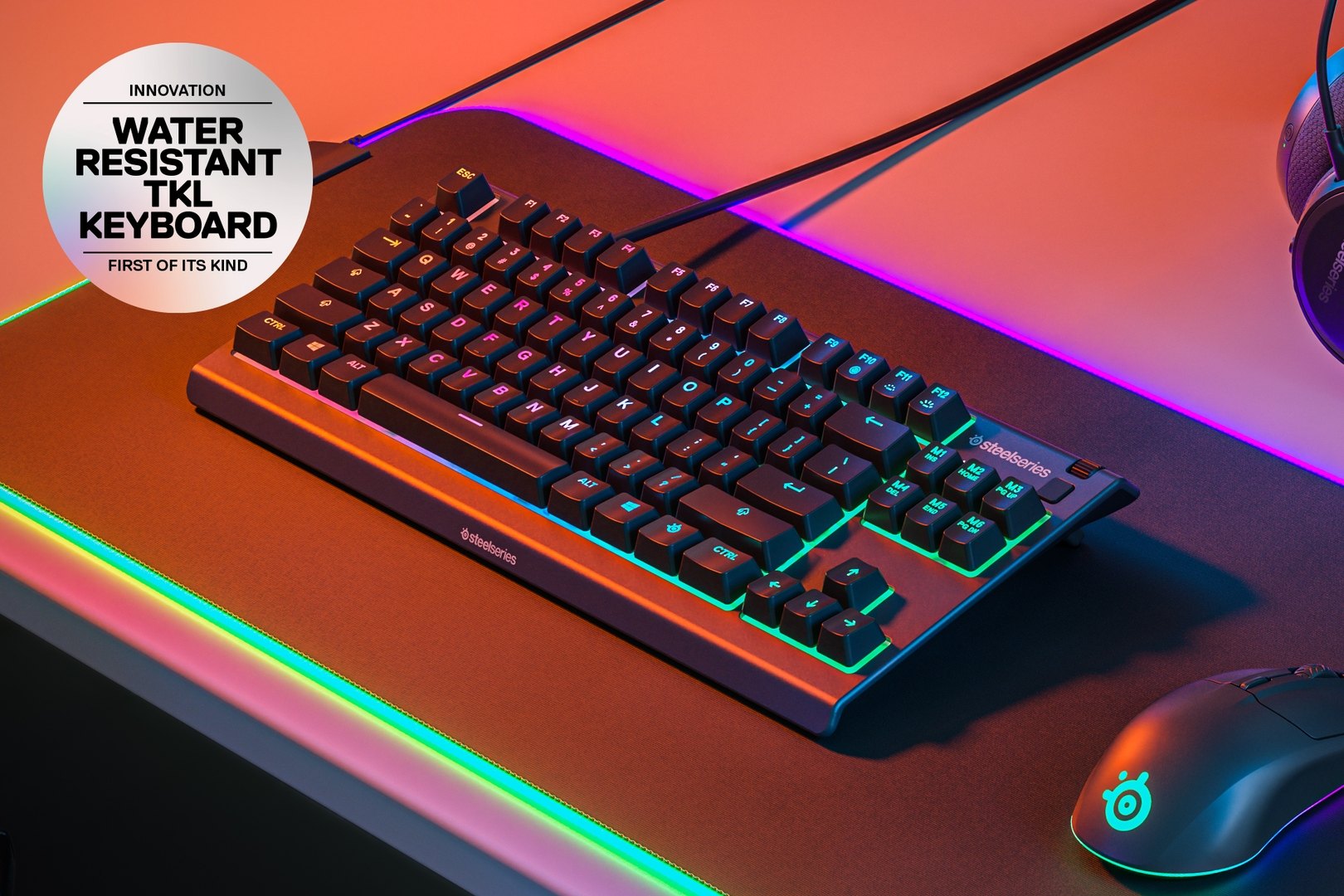
The SteelSeries Apex 3 TKL shows why membrane keyboards should not be dismissed as generic office gear. Its Whisper Quiet switches are designed for low noise, and the tenkeyless layout leaves more room for a mousepad and wider FPS mouse movement. SteelSeries also lists IP32 water resistance, which is a meaningful practical advantage for desks where drinks, snacks, and homework all compete for space.
This is the better choice when your gaming PC is in a shared environment. It is less disruptive for late-night play than a clicky mechanical board, and the smaller layout can make a compact setup feel less crowded. The trade-off is the softer key response: players who love the sharp reset and tactile feedback of mechanical switches may find it less satisfying during long competitive sessions.
Drawbacks: the membrane feel is not as crisp as a good mechanical switch, the lighting is zoned rather than per-key, and the TKL layout removes the number pad.
Who should skip this: skip it if you need a number pad for work or games, want extensive switch customization, or strongly prefer a clear tactile or clicky response.
Best Full-Size Value Pick: Logitech G213 Prodigy
Best Value: Logitech G213 Prodigy
Use-Case Evaluation: Best for players who share one keyboard between gaming, school, and office work and want a familiar full-size layout with quiet operation, a built-in palm rest, and dedicated media controls.
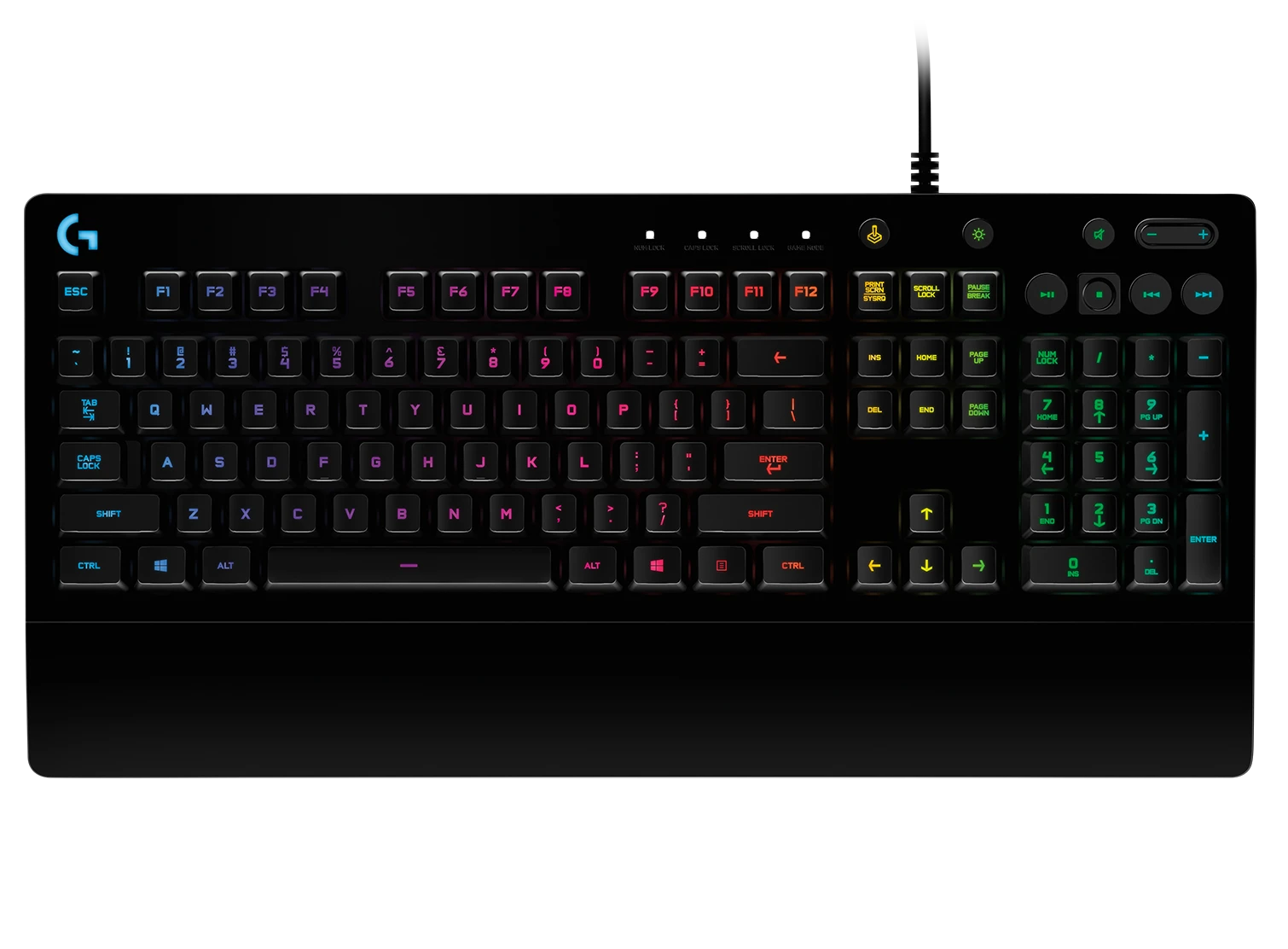
The Logitech G213 Prodigy uses Logitech G Mech-Dome keys, which are designed to provide a more tactile response than a basic office membrane keyboard while keeping the quieter character many shared-room setups need. Its full-size layout, integrated palm rest, adjustable feet, and dedicated media controls make it an easy transition for someone replacing an older standard keyboard.
It is a good fit for hybrid use. You can use the number pad for spreadsheets or school work, then switch to a game without changing desks. The five-zone LIGHTSYNC RGB lighting adds personality without asking you to learn a complicated custom-keyboard ecosystem.
Drawbacks: it needs more desk space than a TKL board, it does not offer the precise switch choice of a mechanical keyboard, and its membrane-based feel may not satisfy players who want a crisp actuation point.
Who should skip this: skip it if you play low-sensitivity shooters on a narrow desk, want hot-swappable switches, or prefer a compact keyboard for travel.
Comparison Table
| Keyboard | Type | Best For | Main Strength | Main Trade-Off |
|---|---|---|---|---|
| Razer BlackWidow V4 X | Mechanical | Dedicated gaming and macro-heavy setups | Defined switch feel and six macro keys | Larger and louder than membrane options |
| SteelSeries Apex 3 TKL | Membrane-style | Quiet bedrooms, dorms, and compact FPS desks | Low noise, TKL space savings, and IP32 water resistance | Softer key feel and no number pad |
| Logitech G213 Prodigy | Mech-Dome membrane | Gaming plus school or office work | Full-size layout, palm rest, and media controls | Less switch choice than mechanical boards |
Which Is Better for Different Gaming Setups?
For competitive FPS and esports-style play, mechanical is usually the more satisfying choice because its response is more defined. A full-size mechanical board can still work well, but measure your mouse space first. If your desk is narrow, a tenkeyless layout may be a better upgrade than spending more on a premium full-size board.
For a shared bedroom, apartment, or dorm, membrane often wins the day-to-day decision. A quieter keyboard can make it easier to play at night without making every movement key audible through a wall or across a shared desk.
For hybrid office and gaming use, choose based on layout rather than marketing language. A number pad and media controls can be genuinely valuable when the same keyboard handles work, study, and games. If you type all day, comfort and noise deserve as much attention as RGB lighting.
For a budget gaming setup, do not assume a mechanical board is the only upgrade that matters. A quieter membrane keyboard, a better mousepad, and clean cable routing can make a modest desk feel more comfortable than one expensive keyboard surrounded by clutter.
FAQ
Is a mechanical keyboard actually faster for gaming?
Not automatically. A mechanical keyboard can feel more immediate because each switch has a defined response, but your game performance depends much more on practice, comfort, key layout, and the rest of your PC setup. Choose mechanical if you prefer the feel, not because it guarantees better results.
Are membrane keyboards quiet enough for a shared room?
Usually, yes. Membrane-style boards such as the SteelSeries Apex 3 TKL are a better starting point for a shared room than clicky mechanical switches. Keycaps still make some sound when bottoming out, so a desk mat and gentler typing also help.
Is a TKL keyboard better for FPS gaming?
It can be. Removing the number pad leaves more horizontal room for the mouse, which is useful for low-sensitivity FPS players. A TKL board is not required, but it is often a practical fit for smaller desks and large mousepads.
Is the Logitech G213 good enough for work and gaming?
Yes, if you want a full-size layout, a number pad, quieter keys, and media controls. It is a sensible shared-workspace option. Look elsewhere if you specifically want mechanical switches, a compact layout, or extensive switch customization.
Should I choose clicky or linear mechanical switches?
Choose clicky switches when you enjoy audible feedback and do not share a quiet space. Choose linear switches when you want a smoother press and less noise. If possible, try a switch tester first because comfort is more personal than a specification sheet suggests.
Final Verdict
For most dedicated PC gaming setups, mechanical is the better long-term choice because the feedback, switch options, and extra controls can make daily use more satisfying. The Razer BlackWidow V4 X is the best overall option for players who want a full mechanical gaming board with macro controls.
Membrane is the better answer when noise, spill resistance, shared spaces, or value take priority. The SteelSeries Apex 3 TKL is the best compact quiet choice, while the Logitech G213 Prodigy works well for a full-size work-and-play desk. Choose the keyboard that fits your room and desk first; the right layout and noise level will matter long after the initial switch-type debate fades.
Sources Reviewed
- Razer BlackWidow V4 X official product page
- SteelSeries Apex 3 TKL official product page
- Logitech G213 Prodigy official product page
GearLab recommendations are based on product specs, buyer-use cases, drawbacks, and real-world setup notes. Affiliate links do not change our picks.
As an Amazon Associate, we earn from qualifying purchases. Product prices and availability are accurate as of the date/time indicated and are subject to change.